
This tutorial helps, how you can create your own laravel 6 login, registration, forget password and reset password project, step by step guide to building your first laravel login authentication and register laravel 6 application.
laravel 6 is recently released with great new features and improvements. We are going to show you how to create a login and register the auth system using one command name PHP artisan ui vue –auth. This command will create some default views blade, controllers and routes. that is a help to login and register users.
Laravel 6 Login, Registration Example
Just follow the below steps and you can create your first login, registration, forget the password, reset password project with laravel 6:
- First Install Laravel Fresh Project
- Configuration changes in .env file
- Generate Laravel Application Key
- Database Migration
- Create a Login Authentication Laravel
- Run the Development Server
- Conclusion
1. First Install Laravel Fresh Project
First, we have to install the laravel new setup in our system. where we installed PHP. open your terminal and type the below command :
composer create-project --prefer-dist laravel/laravel blog
2. Configuration changes in .env file
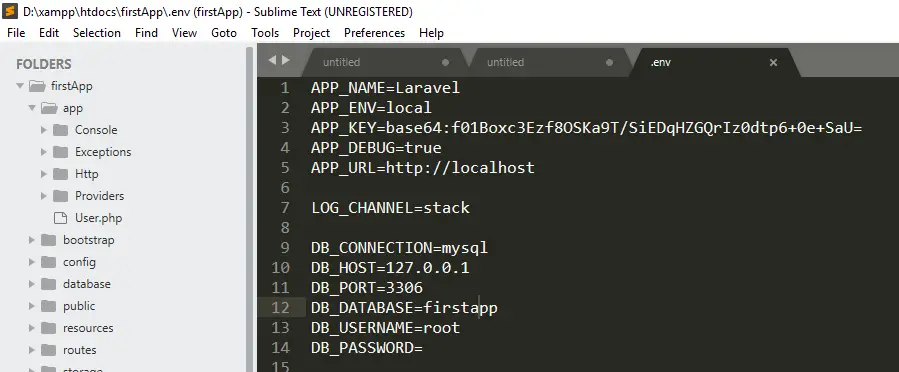
After successfully installed the laravel application, in the next step is configuration .evn file. Let’s open .env file and setup database credentials like database name, database user name, database password, and host.
3. Generate Laravel Application Key
Configuration completed successfully of .evn file, Let’s open the command prompt and generate the laravel application key using this given below command.
php artisan key:generate
4. Database Migration
Before you run php artisan migrate command.
Go to the app/providers/AppServiceProvider.php and put the two line of code inside a boot method
Use Schema;

public function boot() {

 Schema::defaultStringLength(191);

 }
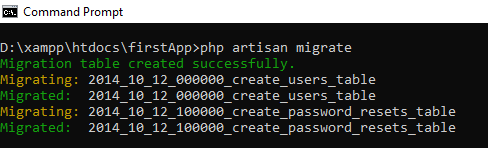
Use this below command, it will automatically create tables in your database. A new migration file is created by you. You update the code in that migration, run PHP artisan migrate again, and you have a new column in your table.
php artisan migrate
5. Laravel Authentication
This command will create routes, controllers and views files for Laravel Login Authentication and registration. It means to provide a basic laravel login authentication and registration Complete system. Let’s open the command prompt and type the below command.
6. Run the Development Server
In this step to use the php artisan serve command .it will start your server locally
php artisan serve

If you want to run the project different port so use this command

php artisan serve --port=8080
laravel authentication is successfully completed, Now Go to the browser and hit the
URL : http://localhost:8000/login
If you did not run PHP artisan server command, direct go to your browser and type the URL
URL : http://localhost/blog/public/Conclusion
We have successfully install laravel 6 fresh new applications with configuration. Now the end of laravel tutorial for beginners steps by step guide to building your first laravel login authentication and register laravel 6 application.